For SHARING GROUPS: “Join Event” links admit you to a waiting room. At the designated start time, a facilitator will let you into the room. Your link will no longer be active after 10 minutes to maintain the sense of safety in the room.

1. If you have RSVP’d for an event, you can sign in to the website and visit the same page for the event that you used to RSVP.
2. Thirty minutes before the event, the meeting ID and password will be displayed along with a join link.
3. Click on the link and follow the instructions to enter the meeting.
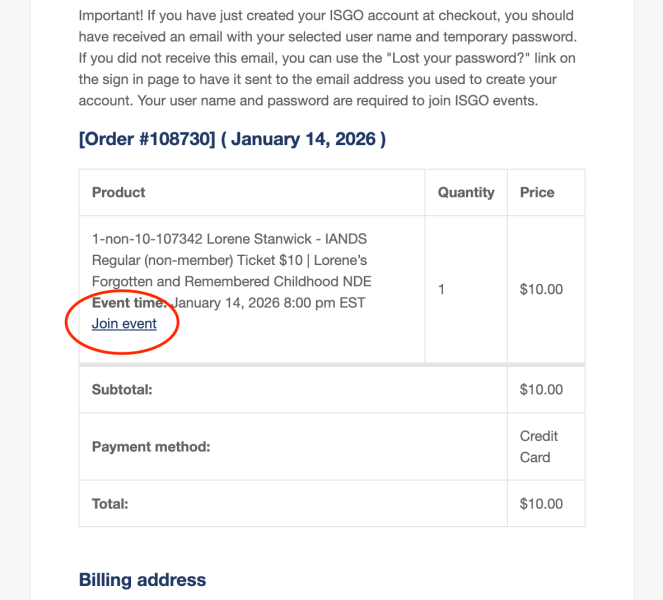
1. If you have RSVP’d for an event, you will receive an email confirmation.
2. There is an invoice within the email. At the top of the invoice, just below the title of the event, is a link titled, “Join Event.” Click on this link.
3. The event page will load. Follow the directions to sign in if needed, and then you can join the event by clicking on the blue link that says, “Join event.”
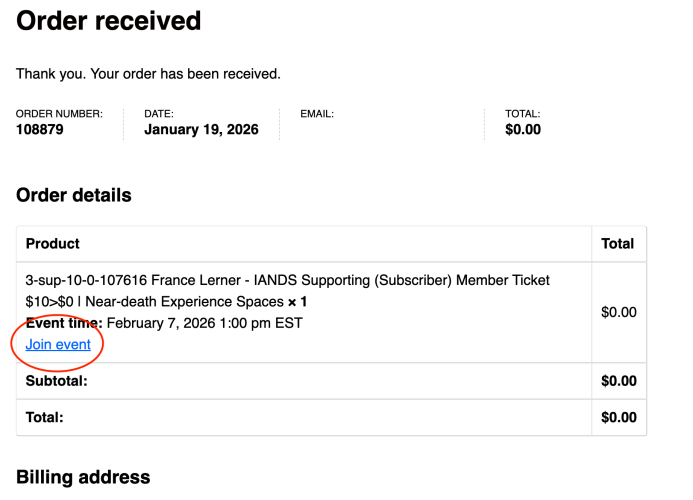
1. Immediately after your purchase, you will see an invoice page.
2. Within the Product portion of the invoice, immediately beneath the title, is a link titled “Join Event.”
3. Click the link and follow the directions to join the meeting.